Hi,
Some time people is still using Microsoft Excel 2003 and certain may up to 2010. Major different between these version is number of rows available. So to set stop point when we loop using VBA code we need to know number of rows available. Below code will trigger this point.
Cells.Rows.Count
Please try it and comment. Thanks
Wednesday, 3 September 2014

Friday, 2 March 2007
How to Open Visual Code for the recorded Macro?
As I mentioned earlier Macro actually using visual basic programming language to perform given task. In order for you create more complicated macro it will be more better for you to understand the basic programming language which is VB. This learning process will be more easier after you record the macro immediately check the VB code. Record ---then Check the VB code. After several time now you will understand What code to be use for the specific task given. There are many ways to open our visual basic editor:
1st Method:
 1) Click visual basic symbol at the toolbar
2) Another window open
3) Click at Module1
4) Immediately you can see the VB code.
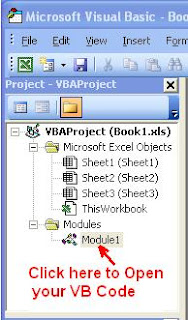
2nd Method
1) Go to Tools>Macro>Macros..
2) Pop up menu ask you to choose macro
3) Choose your macro
4) If you desired to run the macro just click run
5) But this time you need to check VB code click edit
6) Now immediately you can see the code representing your task
I just wanted you guys to familiarize on how to open the VB code..That All
Practice, practice...& practice. O.k
Make sure you are fully understand how to check VB code immediately after record certain macro.
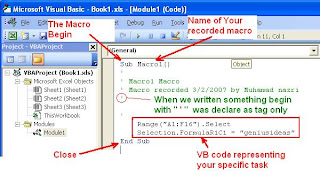
This is VB code editor look like.
How to edit recorded macro? Pls wait for me..Tks
1st Method:
 1) Click visual basic symbol at the toolbar
2) Another window open
3) Click at Module1
4) Immediately you can see the VB code.

2nd Method
1) Go to Tools>Macro>Macros..
2) Pop up menu ask you to choose macro
3) Choose your macro
4) If you desired to run the macro just click run
5) But this time you need to check VB code click edit
6) Now immediately you can see the code representing your task
I just wanted you guys to familiarize on how to open the VB code..That All
Practice, practice...& practice. O.k
Make sure you are fully understand how to check VB code immediately after record certain macro.

This is VB code editor look like.
How to edit recorded macro? Pls wait for me..Tks
Thursday, 1 March 2007
How to run macro in Microsoft Excel from different workbook?
The steps are the same, the only thing you must open your workbook with macro inside and minimize. Now open your new workbook and follow the previous step:

All macro will be listed down if you select Macros in: All open Workbooks
Now you are willing to :
- Go to >Tools>Macro>Macros
- Choose your Macro

All macro will be listed down if you select Macros in: All open Workbooks
- Click at your desired macro and click run
- End.
Now you are willing to :
- record macro.
- Run macro.
- Run macro from different workbook.
Our Next Chapter will be more interesting because involved code editing:
How to edit recorded macro? Pls wait for me..Tks
Wednesday, 24 January 2007
How ro run macro in Microsoft Excel?
Before you can run your recorded macro you have to change your security level to medium:
- Go to > Tools > security

- Tick medium Security level

- Click O.K
- End.


I assume that your previous workbook still open which is inside your sheet 1, range A1:C10 consist of <Geniusideas> word.
Now go to sheet 2 and follow these steps:
- Go to > Tools > macro > Macros….

- Choose your Macro (If you have many type of macro recorded previously).
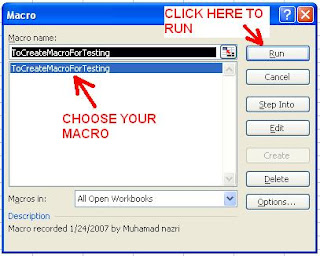
- Click “Run”
- End.


Now you have same result as sheet 1 but this time in sheet 2.
Pls try and try again with different step until you are familiar with it.
If you close and save your excel file, every time you open the file the macro must be enable before you can start using.

Our Next Chapter:
How to run macro in Microsoft Excel from different workbook? Pls wait for me..Tks
Monday, 22 January 2007
How to record macro in Microsoft excel?
Now open your Microsoft excel and create new file and normally by default three worksheets is inside.
Now your sheet 1, range A1:C10 consist of <Geniusideas> words,
Meaning you already have macro recorded inside your excel file that can be use anytime without repeating the above process but we can get same result.
To Stop Recording :
1) Press STOP Button.
OR
2) Go to Tools >Macro >Stop Recording
- Go to > Tools > macro > Record new macro…..
- Rename your macro.
Example : ToCreateMacroForTesting (make sure no space) - Stop button appeared and now you can start recording.
Try these steps:
1 – Select sheet 1
2 – Select range A1 : C10
3 – Type < GeniusIdeas >
4 – Press “Ctrl” button then Follow by “Enter”
- Press Stop Button.
- Select Range A1.
- End.

Now your sheet 1, range A1:C10 consist of <Geniusideas> words,
Meaning you already have macro recorded inside your excel file that can be use anytime without repeating the above process but we can get same result.
To Start Recording :
1) Go to Tools >Macro >Record New Macro

Rename Your Macro :
1) By default it will appear macro1,2,3...follow sequence but it is good for you differenciate inbetween one another.(Example : Tosortfortesting) No space O.K...

To Stop Recording :
1) Press STOP Button.

OR
2) Go to Tools >Macro >Stop Recording

Our Next Chapter will cover:
How to run macro in Microsoft excel? Pls wait for me..Tks
How to create macro in Microsoft excel ?
We can create macro in microsoft excel in two ways :
Example : when you do the recording immediately after the process you can analyze and change the script.
Our Next topic :
How to record Macro in microsoft excel? Pls be patience and wait for me..Tks
- Write your own script using visual basic language.
- Record your task step by step.
Example : when you do the recording immediately after the process you can analyze and change the script.
Our Next topic :
How to record Macro in microsoft excel? Pls be patience and wait for me..Tks
Wednesday, 17 January 2007
What Microsoft Excel Macro can do for you ?
I love so much about macro eventhough my knowledge about Visual Basic programming language was not very good and no formal training. Most of the skill that I learned are from Microsoft Excel help, internet, books and my Colleague Mr Raymund Lawrence Danker.
At my workplace I am handling a lot of data's and I found my subordinate having difficulties to do the sorting, segregating and arranging those data, some more thier skill and knowledge about excel totally zero at that time, since then I decided to learn more about Microsoft Excel macro. Now I am using the macro for :
Their productivity now is up to more than 1000% , I think..
Now you can imagine What microsoft excel macro can do to you?
Next topic:
1) How to create macro in excel ? Pls be patience..OK
wait for me..
At my workplace I am handling a lot of data's and I found my subordinate having difficulties to do the sorting, segregating and arranging those data, some more thier skill and knowledge about excel totally zero at that time, since then I decided to learn more about Microsoft Excel macro. Now I am using the macro for :
- To sort the unwanted data after being download from oracle system
- To arrange the data accordingly
- To format the data meet our requirement
- To arrange multiple sheets of data into a single sheet
- To rearrange data from one format to another format
- To compare data with multiple sheet
- To format the data for standard printing size..More and more
Their productivity now is up to more than 1000% , I think..
Now you can imagine What microsoft excel macro can do to you?
Next topic:
1) How to create macro in excel ? Pls be patience..OK
wait for me..
Subscribe to:
Posts (Atom)